

Wedding planner for iPhone

Your wedding, together.

Guests, budget, to-dos and the schedule for the big day, in one place. Shared with your partner through iCloud, with no account.

Coming soon to theApp Store

Free to start · no account · no ads

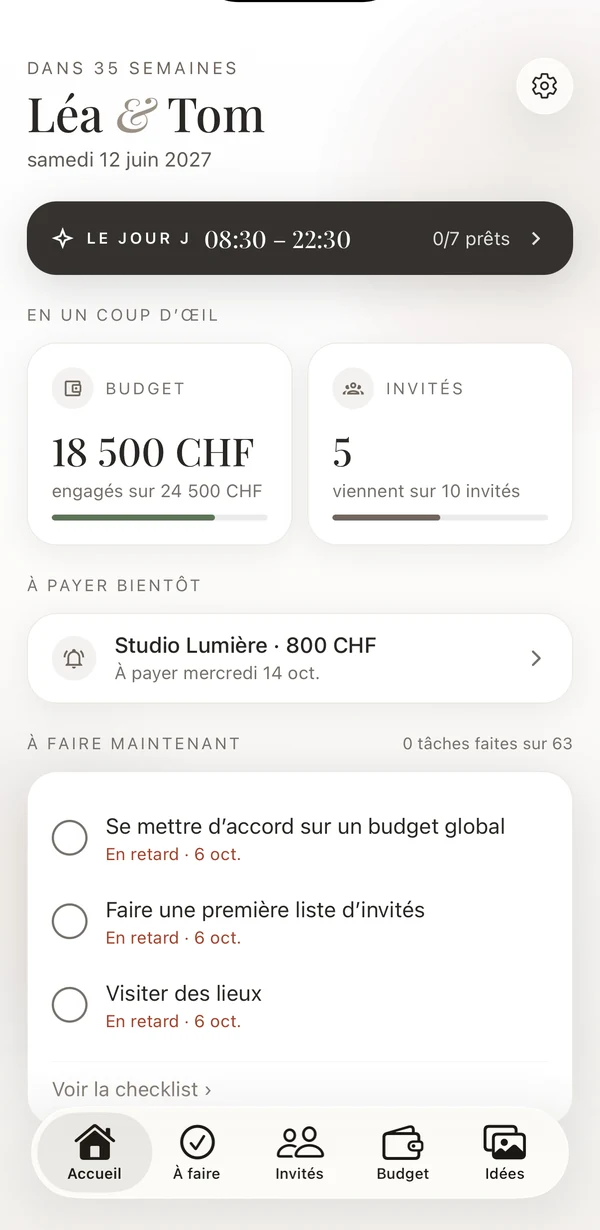
Ouii’s home screen: the countdown, the big day, budget committed, guests attending, what’s due soon and what to do now.

The whole wedding, in one place

Six notebooks that talk to each other: tick a task, a guest replies, a payment goes out, and the home screen keeps up.

01To-do

What’s left to do, and nothing more.

Around sixty suggested tasks, from twelve months before to after, adapted to your country and to the moments of your wedding. Add your own, just like a real list.

  • Colour tags, priority, duration
  • Steps, photos, a note and a link in every task
  • Reminders, search, sorting and filters
To-do

02Guests

Every guest, moment by moment.

Registry office, ceremony, drinks, dinner, brunch: each guest is invited to certain moments and replies for each one. By household, with children, plus-ones, sides and meals.

  • Import from Contacts
  • Views by household, by moment, by side
  • Online RSVP: one link per household, nothing for guests to install
  • Addresses as CSV, diets as PDF
2comingCLComingMJWaitingComingARWaitingComing

03Seating plan

A seating plan that counts with you.

Round or long tables, numbered seats. Tap a free seat to place someone, or let Ouii seat everyone.

  • Automatic seating and room drawingPro
  • A warning when a table overflows or a child sits far from their family
  • The plan for your caterer, as a PDF
1ALMCJSEN2PRTOVGHB

04Budget

What’s paid, what’s left.

A log of your expenses, paid or planned, and money coming in; your categories with what’s left in each; the cost per guest.

  • Your vendors: contact, call, email, website
  • Upcoming payments, with a reminder
  • Contracts, quotes and invoices kept with each vendor
68%−3,500+800−1,200

05Ideas

A board for the mood.

Images, words and emojis by theme: mood, outfits, flowers, decoration, table. Arrange them as a board, or browse them as a mosaic.

  • Board, mosaic and notes
  • A board to share with your vendors
  • Your photos stay in your iCloud
Soft, light,by the water

06The big day

The big day, hour by hour.

The day before, the day itself, the day after: the schedule with places and people, to share as a PDF with your witnesses and vendors.

  • The countdown, with its home screen widget
  • On the home screen: what’s due soon and what to do now
  • The schedule as a PDF, in one tap
08:30Hair11:00Town hall15:00Ceremony19:00Dinner

Together, with no account.

Ouii is shared with your partner through iCloud: one invitation, and the wedding opens on their iPhone. You both add, tick and move things; everything shows up on both sides.

  • No account

    No sign-up, no password. All you need is to both be signed in to iCloud.

  • Your data stays yours

    The wedding lives in your iCloud, shared only with your partner. We have no access to it.

  • No ads, no tracking

    No analytics, nothing sold. Only online RSVP, if you turn it on, goes through our server.

Everything, for both of you, for good.

Ouii is free for up to 30 guests, 2 tables and 20 images, with four themes including the dark theme. When the wedding grows, Ouii Pro unlocks everything, once.

No subscription. The exact price is shown in the App Store. Family Sharing on.

Ouii Pro

Lifetime

£22.99

€24.99 · CHF 24.90 · one purchase

  • Unlimited guests, tables and images
  • Every theme
  • The full seating plan: automatic seating and room drawing
  • For both of you: your partner gets it too

Questions

All the answers are in the help pages.

Do we need to create an account?

No. Ouii has no account and no password. The wedding is kept in your iCloud and shared with your partner through a simple invitation.

Does my partner need to buy Ouii Pro as well?

No. One purchase covers you both: your partner gets it in the wedding you share.

What do our guests see?

Only what you send them. If you turn on online RSVP, each household gets a link that opens only their household: first names, the moments they’re invited to, the meal. Nothing to install, no account.

Where is our data?

In your iCloud, shared with your partner. Only online RSVP, if you turn it on, goes through our server in Europe, and you can erase it all from the app.

Is Ouii on Android?

Ouii is made for iPhone (iOS 17 or later). Your guests can reply from any phone or computer.

Which languages?

English, French, German, Italian, Spanish and Portuguese. Suggested tasks adapt to the country of the wedding.

Say yes, together.

Coming soon to theApp Store